Unlock Huawei B525s-23a and B525s-65a
- France Bouygues Telecom B525s-23a router having Firmware Version 11.182.61.00.309 and WebUI 21.100.36.00.03 can be unlocked using the app.
- United Kingdom EE Telecom B525s-23a router having Firmware Version 11.190.61.01.1217 and WebUI 21.100.46.00.03 can be unlocked using the app.
- NOS Portugal Telecom B525s-23a router having Firmware Version 11.182.61.00.58 can also be unlocked using the app.

Note: The router needs to be unscrewed and a USB cable male-to-male is needed to complete the unlock process.


How to unlock B525s-23a 4G Router
Download and Install Drivers from here. If you are facing problems in driver installation follow this linK
Shot the points (marked with red and orange color circles) using the tweezer or wire as marked in the picture above. Without leaving those points, insert power cable.
Note: The router should remain OFF after inserting the power cable. If it automatically turns on after inserting cable, repeat the process again.
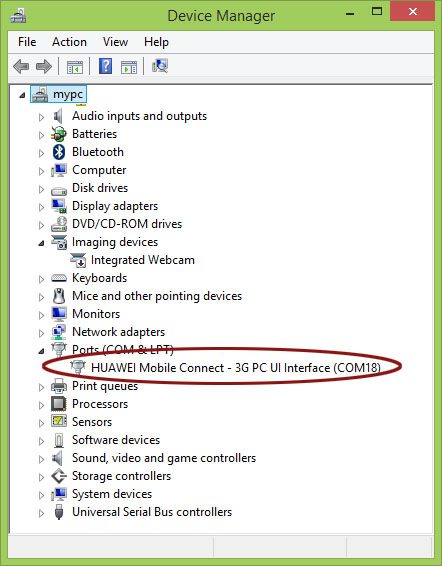
Once the shot is successful, insert USB cable, you will find a new com port in the device manager as shown below.
Download and open it. Go to User Login (Default username and password is unlockmyrouter).
The loader will start installing and you will be able to see the progress in the bar.
Soon, you will get the message “Loader Installed Successfully”.
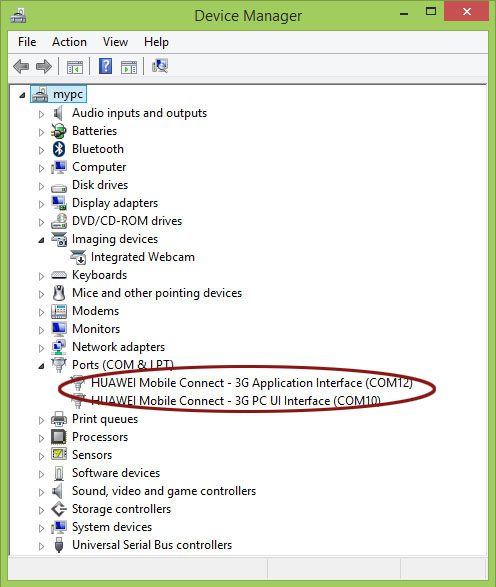
Wait for one minute and check the Device Manager again. It should show two com ports instead of one now as given in the picture below. If your device manager is not showing two ports at this stage then you might be missing appropriate drivers.
Now, It is the time to install the firmware. Choose Flash Firmware option and click submit. You will see the installation process will start. Leave the PC now and don’t do anything else till the installation process is over.

0 Comments